Build your own personal state machine.
You already have rules for how you work. You just never wrote them down, so you explain yourself again every single day. Write them down once, put them in order, and your AI follows your order instead of guessing.
Scroll to move deeperTwo of your rules just crashed. Which one wins?
Grab a rule and drag it to the top. Then run it, and watch it follow your order, not its guess.
Drag a rule to the top, then press Run.
You just used the whole idea. How much detail do you want?
The rest of this page can talk to you at three levels. Pick one, change it whenever you like, and nothing is hidden from you either way.
Reading at: Just use it. The page below is in plain words.
Want all of it at once, in engineering terms? Read the deeper version.
The repository is the memory.
Your notes live with your project, in plain files. Your AI reads them at the start of every session, so it already knows what you decided and why.
Plain text. No service to sign up for. No framework to adopt. It works with any agent because it is just files in your repo. Each note you write is a neuron. Each link between them is a synapse. The map is what lets a cold session find its way through.
That is not a diagram of the idea. It is my own network as it stands today, drawn straight from the files, and it redraws itself every time the network grows.
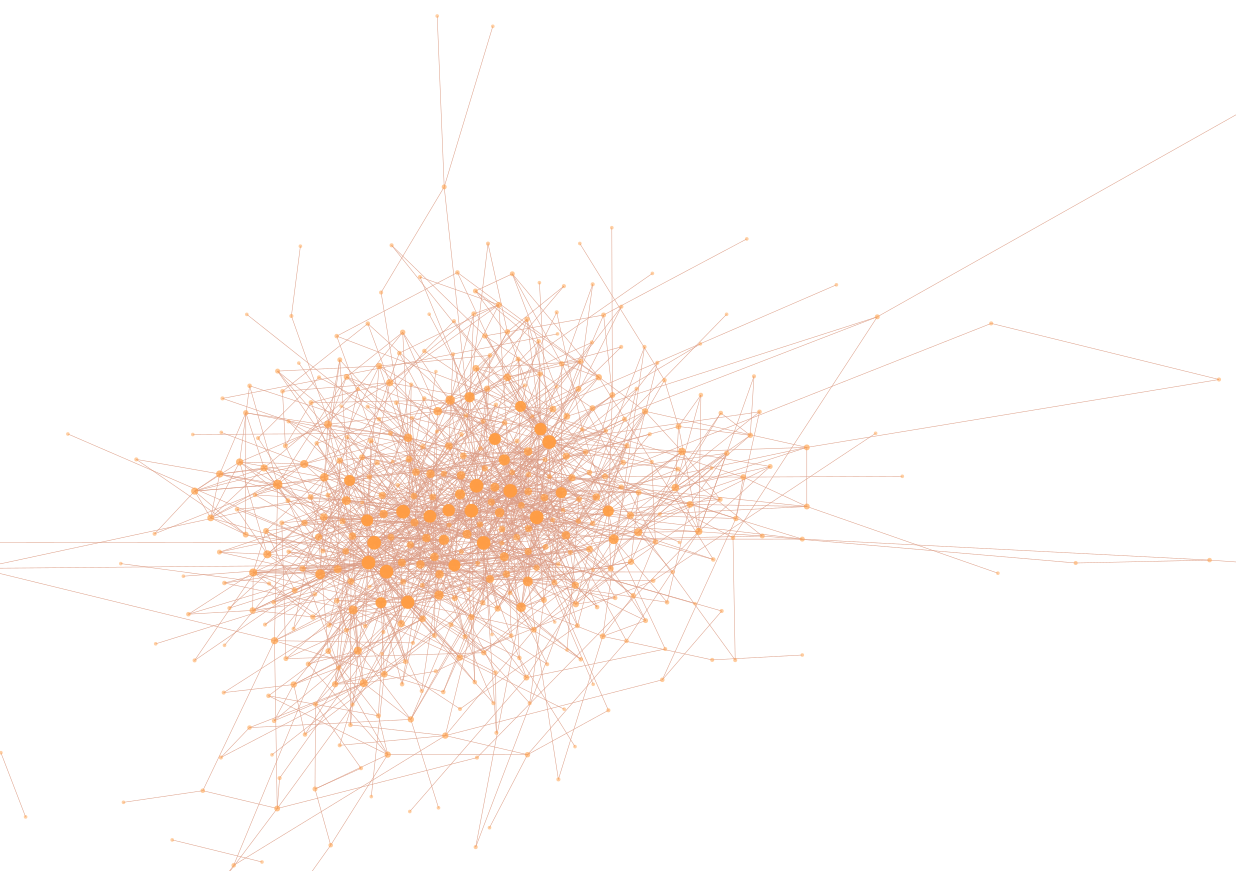
Notes resolve as you get closer.
You are moving through your own files. The further in you go, the more of the project comes back. And all of it stays with you.
Some of this is finished. Some of it is not. Here is the honest split.
-
Built
The memory network. Plain files in your project that your AI reads and writes. This part is done and I use it every day. Copy the prompt below and it is yours.
-
Early
The attention hub. One page that tells me what to work on first. It works on my machine. It is not ready for yours yet.
-
Early
The meeting kit. A way to talk a problem through with your AI and keep the notes. I just started it. Tell me what you would want it to do.
The early two get better when people say what is missing. Tell me what you need.
One paste. Then your project remembers.
Paste it into your AI, in the project you want it to remember. It looks around first, writes down what it finds, and makes a few small files where decisions and gotchas get saved as you go.
Set up a simple project memory for THIS repository, so you and any AI coding assistant I use later can pick up where we left off instead of re-learning the project every session.

Follow these steps in order. Write down only what you can confirm from the repo. Never guess, never invent placeholder facts, and never overwrite or delete anything I already have. If a file already exists, read it and add to it.

1. LEARN THE PROJECT FIRST. Before writing anything, read what is actually here: the README, any package or build file (package.json, pyproject.toml, go.mod, Cargo.toml, Gemfile, composer.json, and so on) for the language and the real commands, the top-level folder layout, and the last 20 commits (git log --oneline -20). If the repo is empty or brand new, say so plainly and keep everything short.

2. PICK THE MAIN FILE. If CLAUDE.md exists, that is the main file. Otherwise, if AGENTS.md exists, that is the main file. If neither exists, create CLAUDE.md. Create the other one as a two-line pointer that says the real content lives in the main file, so any assistant finds it.

3. WRITE THE MAIN FILE SHORT. A newcomer should be able to read it in about a minute. Include only: what this project is (one or two plain sentences), how to run it (the real install, dev, test, and build commands you actually found), and the rules that matter (conventions, do-not-do items, gotchas you can see). If the main file already exists, keep everything useful in it and add only what is missing.

4. ADD THREE SMALL FILES in a docs folder (add to them if they exist, do not overwrite):
   - docs/now.md: what I am working on right now. A few dated lines about the current focus. (At setup, only add.) Going forward, rewrite this file instead of piling onto it: when a line is done or quiet for about two weeks, move it out (to docs/decisions.md if it was a decision, otherwise drop it). Keep it to what is active.
   - docs/decisions.md: decisions and why. One dated entry per real decision, newest first, each saying what was decided and the reason. Seed it from any clear decisions in the README or commit history. If none are clear, leave one line saying the file is for decisions as they come.
   - docs/notes.md: gotchas worth not re-discovering. Seed it with any traps you noticed while reading the repo, otherwise leave one line saying what it is for.

5. WIRE THE HABIT. Add this section to the main file (adjust the paths if you used AGENTS.md as the main file):

   ## How to use this memory
   - Start each session by reading docs/now.md to see what is active.
   - When we make a decision, write it in docs/decisions.md with the date and the reason, in the same session it happens. This is part of finishing the work, not a separate chore.
   - When we hit a gotcha worth remembering, add it to docs/notes.md the same way.
   - Keep this file short. When a section gets long, move the detail into a docs file and leave a one-line pointer here.

6. REPORT BACK with a short list of exactly what you created or changed. Nothing else.
Free and CC0. It is the hero here, so copy it anywhere, no credit needed. Run it once per project. The prompt and the full method are on GitHub.
Give yourself a memory too.
The prompt gives one project a memory. This gives you one. Seven short sessions in your browser, about ten minutes, and you leave with a file you hand to your own AI. Nothing to install and no account.
Seven short sessions in your browser, no account, nothing to install. It asks whose machine you are on first, and on a work machine everything stays inside your own user folder. You leave with a file you hand to your own agent. Prefer to run it inside your agent instead? Start here on GitHub.
The whole system, in order.
The site gives you the pieces. Build With the Memory is all of it in one sequence: why agents forget, how to design a network that survives compaction, how to make it part of daily work, how to search it, and how to build yours in thirty minutes. It is being assembled by the system it teaches, so the decisions behind every chapter are written down in the network that produced it.
The draft is written and the stories are going in now. Chapter one is ready today; one confirmation email, and you can leave any time.
The difference a memory makes.
An illustration, not a real log.
Fourteen pillars, plus more. Take the parts that fit.
The prompt is the short version. This is how I actually work, day to day. Start with the first one. Then the seventh, because that one is why the rest pays off.
The repo is the memory
Context, decisions, and conventions live in committed files, so a cold session stops re-deriving them. When: you are tired of re-explaining your project every session. 02The wide personal network
Facts that stay true across everything you build get one home, outside any single repo. When: you have facts that span projects and no home for them. 03Capture as you go
Turn each hour you lose into three lines, written where the next session will find them. When: you keep re-discovering the same gotcha. 04Research first
When a call is expensive to reverse, get the ground truth down before you commit to it. When: you are about to make a call you cannot un-make cheaply. 05Grill the decisions
The agent interviews you and stress-tests the plan against what is written down. When: you want the agent to interview you, not agree with you. 06Judge panels
More than one reviewer, each with a different lens. When: one reviewer keeps missing things. Then here 07The decision cache
Every settled decision is written once, so the agent stops re-litigating it and review gets cheaper as the project grows. When: you want your review cost to fall as the project grows. 08Human checkpoints
The agent proposes, a person decides. When: agents are moving faster than you can verify. 09Safety nets from mistakes
Each real mistake becomes a written rule or a guard. When: you made a mistake and do not want to make it twice. 10Voice to typed work
Talk it through, capture it, turn it into tracked work. When: you think out loud and lose half of it. 11The session handoff
One word closes a session: the story, the open calls, and where to start land in a dated handoff the next session reads first. When: you stretch sessions because ending one loses the thread. 12Run it cheap
Deterministic checks over model calls, small models for routine passes, load only what you need. No top-tier plan required. When: you are worried this only works on an expensive plan. 13Borrowed memory
Search how other teams work by mirroring their prose, with borrowed text marked as a quote instead of an instruction. When: you want to learn from repos you do not control, safely. New 14State, not just decisions
A NOW file that is rewritten instead of appended, so the network knows what is live and deployed, not just what was decided. When: your agent keeps assuming what is deployed or running right now.No hosted memory. No lock-in. The files stay yours.
If a tool keeps your memory on its servers, your memory is part of what it sells. Here the files sit with your project, so they go wherever it goes. I would rather show you how it works and let you keep the files than charge you every month.
I write about this as I go.
A short letter, when there's something worth saying, about building software and games with AI agents: what I built, what broke, one thing I learned. Optional, and the prompt above never needs it.
You'll get one confirmation email first. Unsubscribe is one click, any time, and I never share your address.
An indie developer. I make games at Turtlevania Games, and I build Playloop, a playtest tool for indie game developers. This method is how I build all of it. I do not have all the answers. I have a way of working that stopped me from losing the same context over and over, and it is written down here so you can take the parts that fit.
Turtlevania Games gives 5% of what it earns to memory disease research, off the top before anyone gets paid. Nothing has been donated yet and I am not asking anyone here for money. Every dollar gets listed publicly the day it moves, with who received it and why. The whole thing, including what it is not.
The prompt is CC0, public domain, copy it anywhere. The templates, hooks, and scripts are MIT. The written method is CC-BY-4.0, share and adapt it, just credit the source. Where this method borrows an idea from someone else, it is credited.